
Furbo 360 Dog Camera Review: Is It Worth It in 2026?
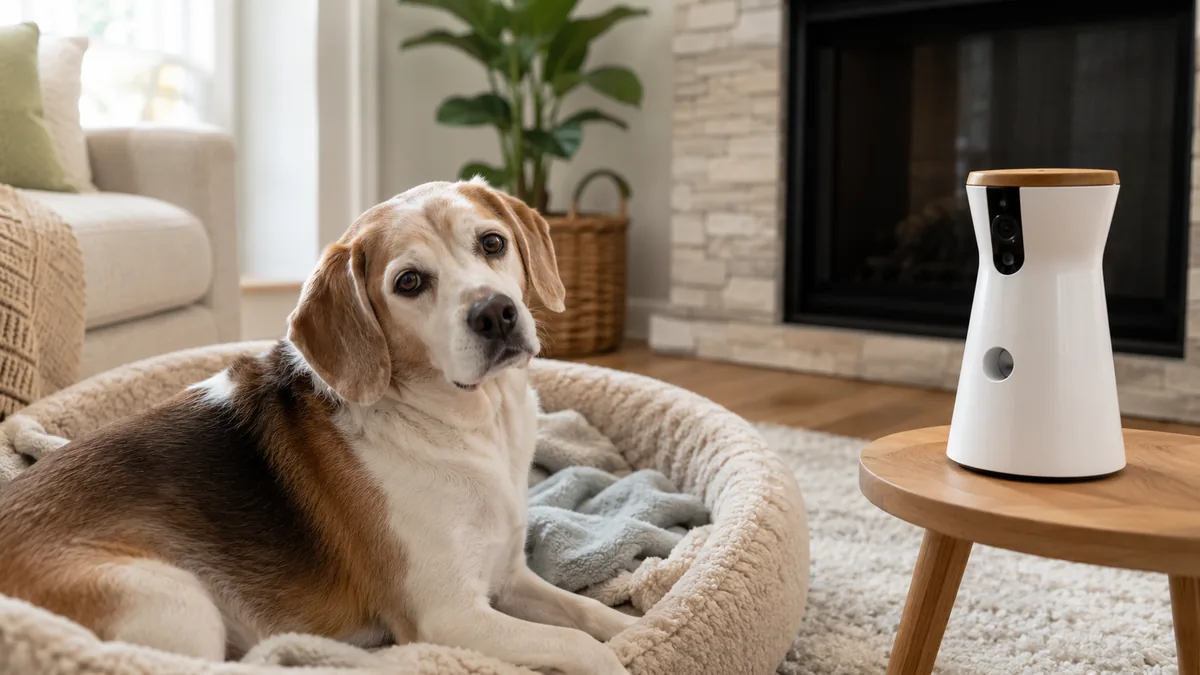
The Furbo 360° Dog Camera is a treat-tossing pet camera designed to help dog owners watch, hear, and interact with their dogs while away from home. Its main features include a rotating 360° view, 1080p video, color night vision, two-way audio, treat tossing, auto dog tracking, and barking alerts.
In this Furbo 360 Dog Camera review, we examine its current features, Furbo Nanny subscription options, pros and cons, and what you can use without a paid plan. We’ll also explain whether Furbo is a practical choice for monitoring a senior dog or a dog that becomes unsettled when left alone.
Furbo 360 Dog Camera Review: Quick Verdict
The Furbo 360° Dog Camera is a strong option for dog owners who want live video, two-way audio, treat tossing, barking alerts, and automatic dog tracking in one pet-focused camera.
The standalone Furbo provides its main everyday features without requiring a Furbo Nanny subscription. You can view your dog live, speak through the camera, toss treats, receive basic barking alerts, and use automatic tracking during live view. More advanced monitoring and recorded-video features require a paid plan.
Best for: Dog owners who want to check on and interact with their dog while away from home.
Main advantage: The rotating camera and treat-tossing feature make it more dog-focused than a standard indoor security camera.
Main drawback: Some of Furbo’s more advanced alerts and video-history features require an ongoing subscription.
Our verdict: The Furbo 360° is worth considering when its interactive dog features matter to you. It may be harder to justify if you only need a basic camera for occasional live viewing.
What Is the Furbo 360° Dog Camera?
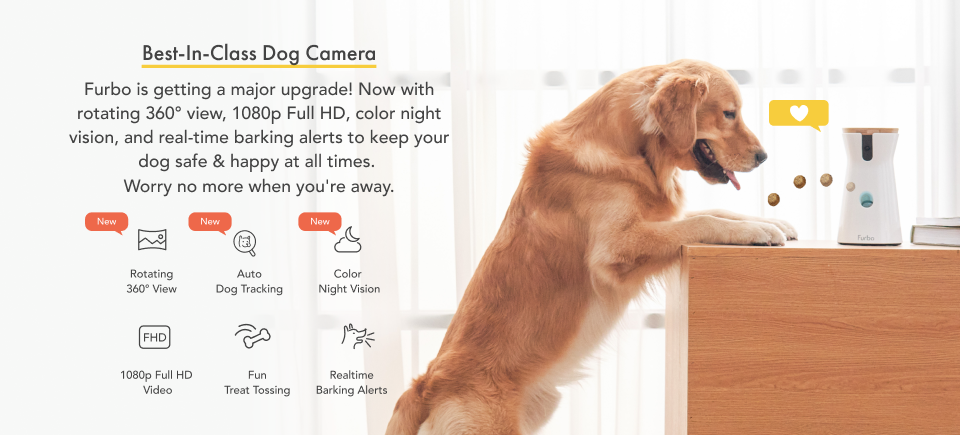
The Furbo 360° Dog Camera is a Wi-Fi pet camera designed specifically for dog monitoring and interaction. Unlike a basic indoor security camera, it combines a rotating 360° view, live video, two-way audio, treat tossing, and automatic dog tracking through the Furbo app.
What Works Without a Furbo Nanny Subscription
The standalone Furbo 360° Dog Camera includes several useful features without requiring a paid Furbo Nanny plan:
- View your dog through 1080p live video in the Furbo app
- Rotate the camera for a 360° view of the room
- Speak to your dog using two-way audio
- Toss treats remotely through the app
- Receive basic barking alerts
- Use automatic dog tracking while live view is open
- Check on your dog using color night vision
Advanced alerts, recorded video history, daily summaries, and additional AI monitoring features require a Furbo Nanny subscription. We’ll explain those costs and features later in this review.
Can the Furbo 360 Help With Dog Separation Anxiety?
The Furbo 360° Dog Camera can help you monitor behaviors such as barking, pacing, whining, or restlessness while your dog is home alone. Live video and alerts may help you recognize when distress begins and gather useful information to discuss with your veterinarian or a qualified dog behavior professional.
Two-way audio and remote treat tossing can also provide brief interaction while you are away. However, every dog responds differently, and a pet camera should not be treated as a cure for separation anxiety.
For moderate or severe separation anxiety, Furbo should be used as a monitoring tool alongside a veterinarian-approved behavior plan. The ASPCA recommends ruling out medical causes first and notes that some dogs may need structured behavior modification and, in more serious cases, medication.
Learn more in the AKC Guide to Separation Anxiety in Dogs.
For another way to create a more reassuring home environment, see our guide to the best calming dog beds for dogs with anxiety.
Who Is the Furbo 360 Dog Camera Best For?
The Furbo 360° Dog Camera is best suited to dog owners who want more interaction and dog-specific monitoring than a standard indoor security camera provides.
| Best For | Why the Furbo 360° Fits |
|---|---|
| Owners who leave their dog home during the day | Live video and barking alerts help you check what is happening |
| Dogs that move around the room | The rotating view and automatic dog tracking help keep them visible |
| Owners who want remote interaction | Two-way audio and treat tossing allow brief interaction through the Furbo app |
| Senior dogs or dogs recovering from an injury | Live monitoring can help you check activity, rest, and movement while away |
| Owners who do not want a required subscription | The standalone model includes live view, two-way audio, treat tossing, and basic barking alerts |
The Furbo 360° may be especially useful when you want to do more than simply watch your dog. Its rotating camera, treat-tossing feature, and pet-focused app make it more interactive than many basic home cameras.
If you are using a pet camera to watch an older dog’s movement and daily activity, our Senior Dog Mobility Assessment can help you recognize possible changes in balance, strength, and mobility.
How to Set Up the Furbo 360 Dog Camera
Setting up the Furbo 360° Dog Camera requires the Furbo mobile app, Bluetooth, a smartphone, and a reliable 2.4 GHz Wi-Fi connection.
Furbo 360 Setup Steps
- Download the Furbo app from the Apple App Store or Google Play.
- Turn on Bluetooth on your phone.
- Plug in the Furbo and wait for the indicator light to blink yellow.
- Open the app and create or sign in to your Furbo account.
- Select the Furbo 360° Dog Camera during device setup.
- Choose your home’s 2.4 GHz Wi-Fi network and enter the password.
- Wait for the camera to connect, then give your Furbo a name.
- Follow the app’s onboarding instructions before introducing the treat-tossing feature to your dog.
For the best room coverage, Furbo recommends positioning the camera approximately 2 to 4 feet above the floor in an open area where it can rotate without being blocked.
Important Wi-Fi Requirement
The Furbo 360° connects to 2.4 GHz Wi-Fi. If your router combines 2.4 GHz and 5 GHz networks, you may need to select or temporarily enable the compatible 2.4 GHz connection during setup.
Furbo Nanny Subscription Cost: Is It Required?
A Furbo Nanny subscription is optional when you purchase the standalone Furbo 360° Dog Camera. Without a paid plan, you can still use live video, two-way audio, remote treat tossing, and basic barking alerts.
The paid subscription adds features such as recorded video history, advanced activity alerts, emergency notifications, pet identification, and additional AI-powered monitoring.
Current Furbo Nanny Pricing
| Furbo Nanny Plan | Monthly Plan | Yearly Plan | Two-Year Plan |
|---|---|---|---|
| Standard | $9.99 per month | $7.99 per month | $7.49 per month |
| Premium | $12.49 per month | $9.99 per month | $9.37 per month |
The yearly and two-year prices above are the monthly equivalents displayed by Furbo for longer-term plans.
The Standard plan includes three days of video history and expanded pet, safety, and home alerts. The Premium planincreases video history to seven days and includes Furbo’s broadest monitoring features.
For most owners, the best approach is to start with the Furbo’s free standalone features. Consider Furbo Nanny only when recorded video history and advanced alerts would be genuinely useful. Furbo’s current U.S. pricing and plan features are listed in its official support documentation.
Furbo 360 Dog Camera Features at a Glance
| Feature | What It Does | Subscription Required? |
|---|---|---|
| 1080p Full HD video | Provides a clear live view through the Furbo app | No |
| Rotating 360° view | Lets you pan around the room instead of viewing one fixed angle | No |
| Auto Dog Tracking | Follows your dog automatically while live view is open | No |
| Two-way audio | Lets you hear and speak to your dog remotely | No |
| Remote treat tossing | Dispenses compatible treats through the Furbo app | No |
| Color night vision | Helps you monitor your dog in low-light conditions | No |
| Basic barking alerts | Sends an app notification when Furbo detects barking | No |
| Video history and advanced alerts | Adds recorded clips and expanded AI monitoring | Yes |
Furbo 360 Dog Camera Pros and Cons
Pros
- Rotating 360° view provides more room coverage than a fixed camera
- 1080p live video with color night vision
- Two-way audio lets you hear and speak to your dog
- Remote treat tossing adds interaction while you are away
- Automatic dog tracking works during live view
- Basic barking alerts do not require a Furbo Nanny subscription
- Designed specifically for monitoring dogs rather than general home security
Cons
- More expensive than many basic indoor security cameras
- Advanced alerts and recorded video history require a paid subscription
- Requires a reliable Wi-Fi connection and smartphone app
- Treat tossing works best with compatible dry, round treats
- Some dogs may need time to adjust to the camera’s sounds and treat dispenser
- It can help monitor separation-anxiety behaviors, but it does not treat the underlying condition
Overall, the Furbo 360° Dog Camera offers useful dog-specific features without requiring a subscription for basic live monitoring, talking, treat tossing, and barking alerts. The main question is whether those interactive features are worth the higher price compared with a standard indoor camera.
Where to Buy the Furbo 360 Dog Camera
The Furbo 360° Dog Camera is available through Furbo’s official website. Before buying, check the current price, available promotions, included features, and whether the offer includes a Furbo Nanny subscription trial.
Furbo 360 Dog Camera FAQ
Does the Furbo 360 require a subscription?
The standalone Furbo 360° Dog Camera can be used without a Furbo Nanny subscription. Live video, two-way audio, treat tossing, basic barking alerts, and automatic tracking during live view are available without a paid plan. Some Furbo purchase offers are sold as subscription-required bundles, so check the terms before ordering.
Does the Furbo 360 work without Wi-Fi?
No. The Furbo 360° requires a reliable 2.4 GHz Wi-Fi connection to connect with the Furbo app. It does not connect directly to a 5 GHz-only network.
What treats work best in the Furbo 360?
Furbo recommends dry, firm, round treats measuring approximately one-half inch in diameter. Sticky or easily crumbled treats are more likely to become stuck or create crumbs inside the dispenser.
Does the Furbo 360 automatically follow your dog?
Yes. Auto Dog Tracking can rotate the Furbo 360° to follow your dog while you are watching live video without a subscription. Automatic tracking within recorded video history requires Furbo Nanny.
Final Verdict: Is the Furbo 360 Dog Camera Worth It?
The Furbo 360° Dog Camera is worth considering if you want more than a basic indoor security camera. Its rotating 360° view, two-way audio, treat tossing, barking alerts, and automatic dog tracking provide useful ways to monitor and interact with your dog while you are away.
It is best for owners who expect to use its dog-specific features regularly. If you only need occasional live video, a less expensive indoor camera may provide enough functionality.
A Furbo Nanny subscription is not required for the camera’s main features, but advanced alerts and recorded video history cost extra. Consider both the current camera price and optional subscription cost before deciding.
Bottom line: The Furbo 360° offers a good combination of dog monitoring and remote interaction, but its higher price is easiest to justify when you will regularly use the rotating view, treat tossing, and dog-focused alerts.
